Update server: generate genesis and L1 state
Updates zksync-os-server and its local-chains setup repository with the new genesis and L1 state.
Usually, the script is used by the protocol upgrade operator or automation to perform the protocol upgrade.
It can be used to create or update local test setups for a given protocol version or with a custom version of era-contracts.
Script performs the following steps:
- Build zkstack CLI: Compiles the zkstack command used to create/init ecosystems and chains.
- Build L1 contracts.
- Generate
genesis.json. - Fund necessary rich wallets.
- Deploy required L1 contracts.
- Update local-chains configurations, copies required chains and wallets files.
- Generate L1 -> L2 deposit tx for rich wallets.
- Updates verification key hash.
- Regenerate
contracts.jsonused by the L1 watcher.
The script updates the following files in the zksync-os-server repository:
local-chains/<protocol_version>/**/*- local chain configuration for chosen protocol versionlib/l1_watcher/src/factory_deps/contracts.json- L1 contracts configuration used by the L1 watcherlib/types/src/protocol/proving_version.rs- new verification key hash (if it changed, otherwise it is not updated)
Local use
REPO_DIR="/path/to/zksync-os-server" \
ERA_CONTRACTS_PATH="/path/to/era-contracts" \
ZKSYNC_ERA_PATH="/path/to/zksync-era" \
PROTOCOL_VERSION=<protocol_version> \
    uv run -m scripts.update_server
To run the script, you will need:
- General prerequisites including uv, Rust and NodeJS
- Specific protocol version specified through
PROTOCOL_VERSIONenv variable- Available protocol versions are defined in the local-chains directory of the
zksync-os-serverrepository as subdirectories. For example,v30.2orv31.0.
- Available protocol versions are defined in the local-chains directory of the
In addition, the script requires access to the following repositories, which should be specified via corresponding path environment variables:
| Repository | Env Variable | Protocol version → Branch Mapping |
|---|---|---|
| zksync-os-server | REPO_DIR | all versions → main |
| era-contracts | ERA_CONTRACTS_PATH | v30.2 → zksync-os-stablev31.0 → draft-v31-zksync-os |
| zksync-era | ZKSYNC_ERA_PATH | v30.2 → zkstack-for-zksync-osv31.0 → draft-v31 |
Also, make sure you have the right tooling versions:
| protocol | foundry-zksync | anvil version |
|---|---|---|
| v30.2 | nightly-ae913af65381734ad46c044a9495b67310bc77c4 | 1.5.1 |
| v31.0 | 1.3.5-foundry-zksync-v0.1.5 | 1.5.1 |
Detailed instructions on how to install the required tooling can be found in the prerequisites guide.
Please, additionally check protocol compatibility to ensure the correct versions are used.
GitHub Actions
The script supports execution via GitHub Actions update-server.yaml workflow
that can be triggered manually via GitHub Actions UI interface.
Input parameters
| Name | Required | Description |
|---|---|---|
protocol_version | ✅ | Protocol version to update. Determines default dependency mappings. |
zksync_server_branch | ✅ | Base branch of zksync-os-server used for the update. |
zksync_era_version | ❌ | Explicit zksync-era version. If empty, derived from protocol_version. |
era_contracts_version | ❌ | Explicit era-contracts version. If empty, derived from protocol_version. |
commit_changes | ❌ | Whether to commit changes back to the repository. Defaults to true. |
open_pr | ❌ | Whether to open a PR for the committed changes. Defaults to true. |
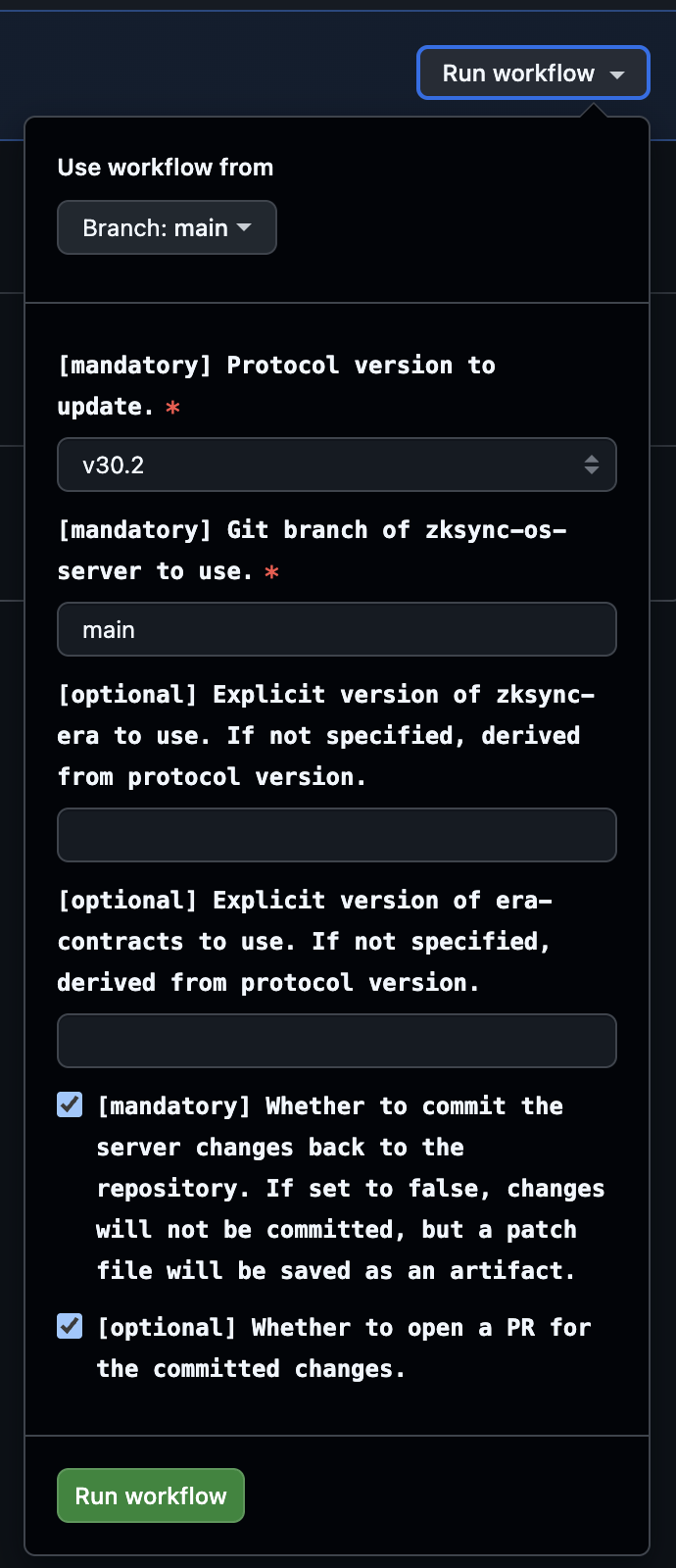
Follow more detailed tutorial in the GitHub Actions guide.
Outputs
On successful runs, the workflow uploads server_<protocol_version>.patch Git patch file with the changes made to the zksync-os-server repository.
If commit_changes and open_pr are set to true, a PR is opened automatically with the changes.
On failed runs, the workflow saves logs from the workspace .logs directory as an artifact.
Script dependencies
The script relies on the following external resources:
If the script fails, it means that one of the dependencies is changed or unavailable. In this case, the script needs to be updated accordingly.
- Wrong tooling versions → incompatible with the contracts and scripts
- To fix: check the required versions in the
protocol version and branchestable above and in the protocol compatibility guide, and install the correct versions
- To fix: check the required versions in the
- Unable to start anvil → anvil is already running on 8545 port
- To fix: stop another anvil instances you already have or change the port it runs on
Any other issue in the operations performed by the script is likely caused by changes in the dependencies, and requires checking the steps of the script and updating it accordingly.
If you notice any such changes are required, please, reach out to the owners or create a PR with the required updates.